Sparehand Works

SWAutomation for small and mid-sized firms

Pilot: try it, pay when it works.

We turn manual reports, invoice re-typing and stock checks in Excel into automation. Before we start, we agree in writing on exactly what should improve and what it costs. You pay once the goal is met on your own data.

  • Written agreement
  • Measurable criterion
  • Fixed price upfront

00Ground rules

We carry the risk of the pilot, not you.

Everything that matters is written down upfront. These four things apply to every pilot.

1hfree intro call, on site or online
48hto a written pilot proposal after the call
2–4weekstypical length of a pilot on one process
0CZKis what you pay if the pilot misses the agreed criterion

01The problem

Work everyone does by hand and everyone knows “could be done better”

This isn't about big systems. It's about the hours that disappear every week into copying, re-typing and checking.

Every Monday

The branch report is assembled by hand: open several files, copy, align, check the totals.

Every day

PDF invoices and orders are re-typed into the accounting or stock system. A typo is found only by the customer.

Too late

Missing stock is noticed when it has already run out. Inventory is checked by eye, or not at all.

On every change

Supplier price lists are copied into your own spreadsheets row by row.

On sick days

Only one colleague knows the report. When she's away, nobody knows how to do it.

Silently

The spreadsheet picked up an old file and nobody noticed. Decisions were made on last week's numbers.

Every month

The campaign report is built from exports of several tools. Each names channels and dates differently, and someone aligns it all by hand.

Before payday

Attendance and timesheets are re-typed from spreadsheets into payroll inputs, and errors are hunted down by hand.

At month-end

Actuals against budget are pieced together by the department from business system exports, because IT has other priorities.

All of this can be automated so it runs on its own and a person only checks the result. No new system, no replacing the tools you are used to.

02Who it’s for

Find your kind of work

Pick what you do. Each role shows three examples of manual work we can turn into automation, plus a link to the closest example.

What we typically automate

Small business owner

  1. Weekly business overviewSales, costs and unpaid invoices in one sheet instead of piecing it together from several exports.
  2. Overdue invoicesEvery morning a list of unpaid invoices and reminders ready to send.
  3. Quotes from a templateA quote or a simple contract filled in from the customer’s details and your price list.
Would it pay off for you?Calculate the payback
What we typically automate

Accountants and accounting firms

  1. Invoices from PDFData from received invoices extracted into a sheet or an import file. Unclear items flagged for review.
  2. Checks before bookingVAT calculation, duplicates and the bank account against the supplier record.
  3. Missing documentsA list of clients who haven’t sent this month’s documents yet, with a reminder ready to go.
Closest example:Processing PDF invoices
What we typically automate

Online shop

  1. What’s running outEvery morning a list of products that will soon sell out, with a proposed order for each supplier.
  2. Supplier price listsNew prices and availability turned into an import file for your shop, no re-typing.
  3. Sales overviewWeekly sales by product and channel from the exports of your shop and other sales channels.
Closest example:Stock monitoring
What we typically automate

Production and warehouse

  1. Minimum stockMaterials monitored against consumption and lead times, with a warning before they run out.
  2. Plan against actualsA daily overview of output against the plan, from your system’s export.
  3. Stocktake differencesCounted stock compared with the system and a list of differences to resolve.
Closest example:Stock monitoring
What we typically automate

Sales

  1. Sales reportSales by rep, customer and region, ready every Monday morning.
  2. Target trackingActuals against target for every sales rep, sent by e-mail.
  3. Customers who stopped orderingA list of customers who haven’t ordered for longer than usual.
Closest example:Merging branch reports
What we typically automate

Controlling and finance in a larger company

  1. Monthly reportingBuilt from business system exports and partial spreadsheets, with totals checked against the source.
  2. Actuals against budgetA comparison by cost centre and a list of variances above a set threshold.
  3. No more manual copyingRepeated data preparation in Power Query instead of pasting between files.
How we work with teams:For teams in larger companies
What we typically automate

Purchasing and logistics

  1. Open purchase ordersAn overview of supplier orders with confirmed dates and a warning about delays.
  2. Stock and goods in transitWhat is in stock and what is on the way, with a warning before a shortage.
  3. Price list changesA supplier’s new price list compared with the previous one, with a list of items that went up.
Closest example:Stock monitoring
What we typically automate

Marketing

  1. Campaign reportA monthly overview merged from ad platform exports, web analytics and e-mailing.
  2. Consistent namesCampaigns and channels from different tools mapped to one naming scheme so they add up.
  3. Budget trackingCampaign spend against plan, with a warning as the limit gets close.
What we typically automate

HR and administration

  1. Attendance and timesheetsHours from attendance records and timesheets turned into payroll inputs, with a check for missing days.
  2. Contracts from a templateContracts, amendments and confirmations filled in from employee details.
  3. Deadline trackingReminders for expiring contracts, probation periods and trainings.
Would it pay off for you?Calculate the payback

03How it works

Three steps. You only pay for what actually works.

Call, pilot, maintenance. Every step has a clear outcome, and nobody commits before it's clear the thing can be done.

Step 1

Intro call

One free hour, on site or online. We look at the one process that slows you down most.

  • We tell you whether it can be done and whether it pays off
  • If it doesn't make sense, we say so right away
  • Written pilot proposal within 48 hours

Step 2

Pilot

One process, usually 2–4 weeks. On your data, in your environment.

  • In writing upfront: what, how it's measured, who confirms
  • Fixed price, no extra hours
  • You pay only after the criterion is met

Step 3

Maintenance

A monthly fee so the automation still runs six months from now.

  • We monitor every run and contact you if something fails
  • Adjustments when an export or system changes
  • Handover guide and documentation included
Runs on your sideOn your computer, server or Microsoft 365. Not on our laptop.
Rules where numbers matterMoney and stock are handled by fixed rules. AI only where it truly helps.
Checked against the sourceWe compare the result with the manual version before we call it done.
A named ownerOne person on your side who receives and confirms the result.

04Examples

Three typical automations

The examples run on made-up data of a fictional company. The approach is the same as in a real pilot. Drag the handle in the picture to compare before and after (screenshots are in Czech).
Before
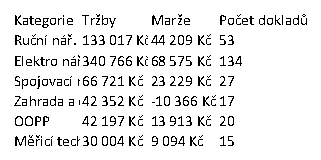
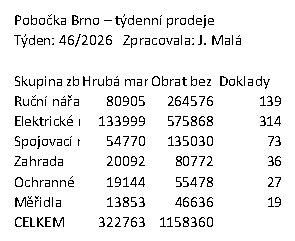
Brno branch export: a title above the table, truncated column names
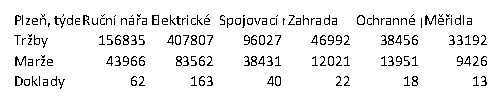
Pilsen branch export: the table turned sideways
Olomouc branch export: numbers stored as text, abbreviated categories
Tyden;Kategorie;Trzby;Marze
46;Ruční nářadí;185102,00;53346,00
46;Elektrické nářadí;426173,00;90779,00
46;Spojovací materiál;113104,00;41687,00
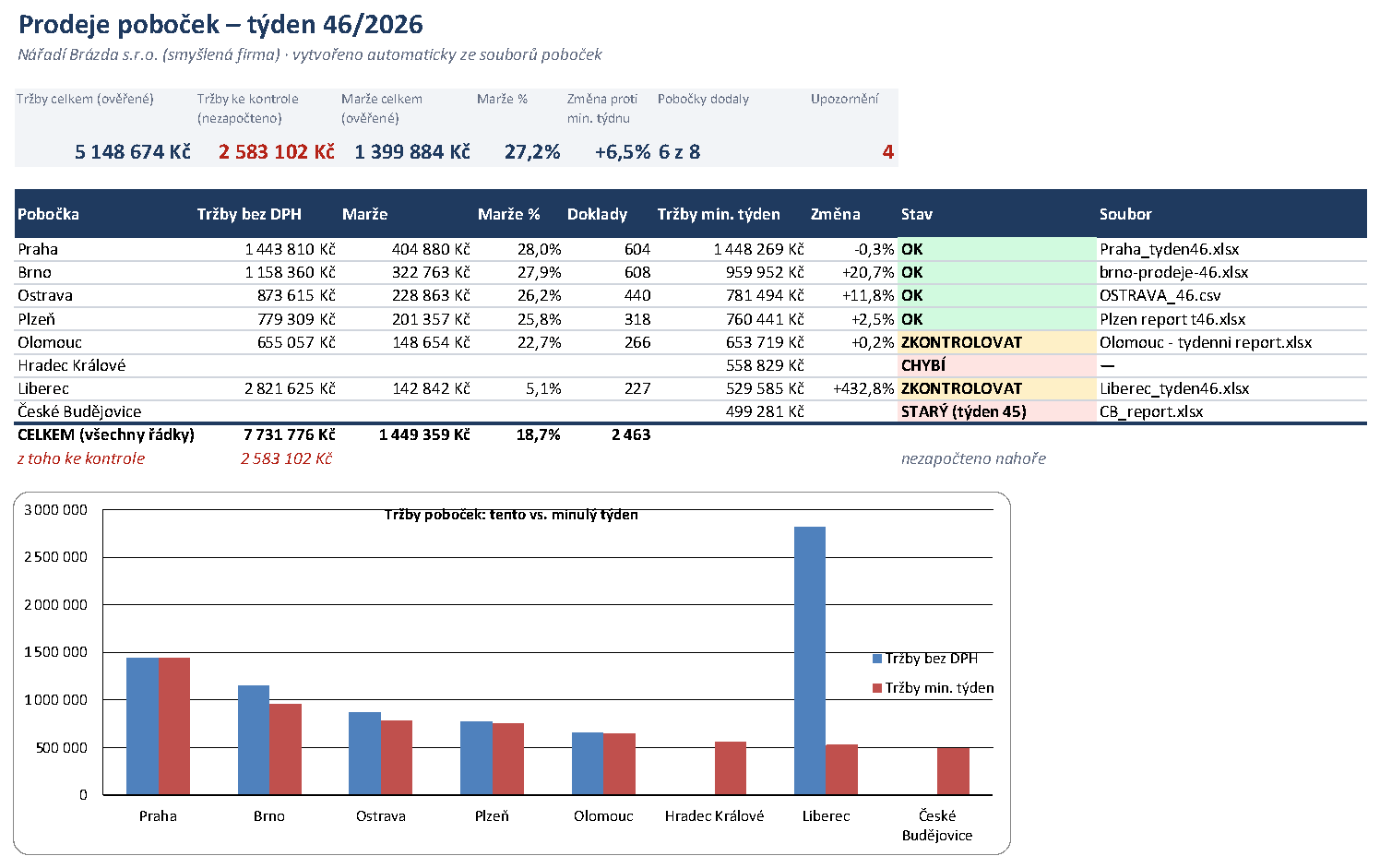
After
Resulting branch overview: sales, margin, change against last week, status of each branch and a chart

Made-up data, real program output.

Merging branch reports

BeforeExports from each branch are copied by hand into one spreadsheet.

AfterOne button or a scheduled run. A finished overview that warns about missing or outdated files.

For companies with several branches, warehouses or sales reps.
Before
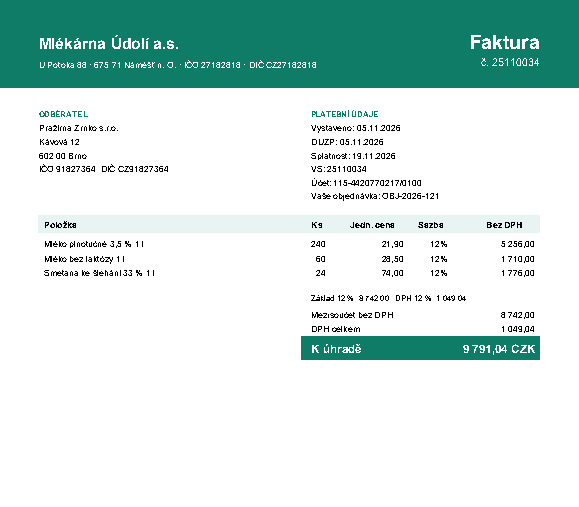
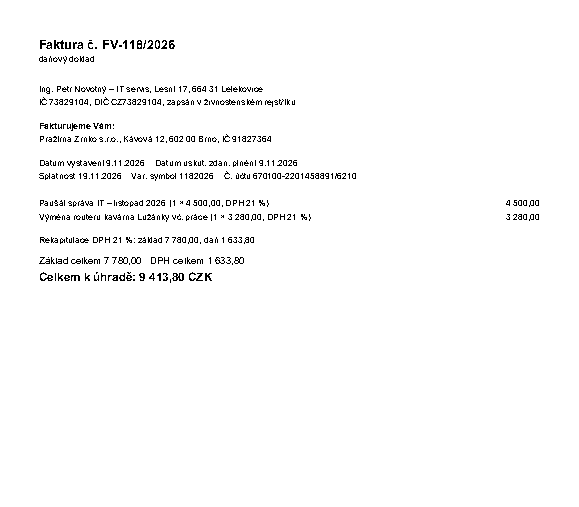
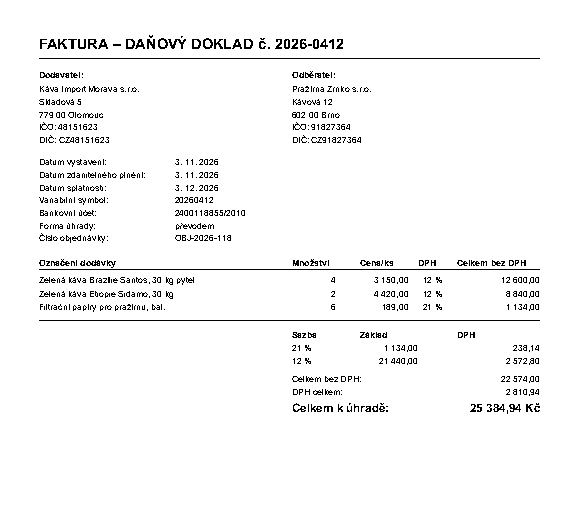
Invoice with a classic layout
Invoice with a modern layout
Sole trader's invoice, text in lines
After
15invoices read
9ready to book
6to review
Manual review sheet: severity, supplier, what is wrong and what to do
  • ERRORWrong 21 % VAT: 768.00 CZK on the invoice, 1,344.00 CZK is correct
  • ERRORBank account differs from the supplier record
  • ERRORDuplicate: the same invoice already arrived in another file
  • WARNING8 days overdue

Made-up data, real program output.

Processing PDF invoices

BeforeInvoices arrive by e-mail and someone re-types them into the system.

AfterData is extracted automatically into a review sheet or an import file. A person only confirms unclear items.

For accounting, purchasing and companies with dozens of invoices a week.

Before
Kód;Název;Skladem;Rezervováno;Dodavatel;Nákupní cena
LS-001;Šampon levandule 250 ml;31;4;BioLab Zlín s.r.o.;89,00
LS-002;Šampon kopřiva 250 ml;253;0;BioLab Zlín s.r.o.;89,00
LS-003;Kondicionér rozmarýn 200 ml;95;1;BioLab Zlín s.r.o.;95,00
LS-004;Sprchový gel citrus 300 ml;258;0;BioLab Zlín s.r.o.;72,00
LS-005;Sprchový gel máta 300 ml;216;1;BioLab Zlín s.r.o.;72,00
LS-006;Tělové mléko bambucké 200 ml;83;1;BioLab Zlín s.r.o.;118,00
…
=VLOOKUP(A2;sales!A:F;4;0)
=AVERAGE(D2:D91)
=C2/E2   → how many days?

After
2×running out
2×to order
36,594 CZKproposed orders
Order today sheet: status, code, name, supplier, days of stock left, sell-out date and proposed quantity
  • RUNNING OUTLavender shampoo: runs out on 22 Nov, earliest delivery 29 Nov → order 216 pcs
  • ORDERHoney & oat soap: won't last the lead time plus buffer → order 120 pcs
  • E-MAILDraft order for each supplier, ready to send

Made-up data, real program output.

Stock monitoring

BeforeInventory is checked by hand and shortages are spotted too late.

AfterEvery morning a list of what to order and when, with a warning about upcoming shortages.

For manufacturers, wholesalers and online shops with a warehouse.

A detailed walk-through: what goes in, what comes out and how the result is checked.

See the examples

05Indicative pricing

A fixed price before we start anything

We quote the exact price after the intro call, once we have seen the process and the data. Here is what to expect.

Intro hour: freeWe go through one process and tell you whether it can be done, at what cost and how long it takes.
Pilot · one process
from 15,000 CZK
excl. VAT (we are not VAT payers)
one-off, paid only after the criterion is met
  • Written agreement with a measurable goal
  • Usually 2–4 weeks
  • Verified on your data
  • Guide and a short training
S · 15,000 CZK1–2 inputs, 1 output
M · 25,000 CZKreport from several sources
L · 40,000 CZKconnected to a system
Maintenance · monthly
from 2,000 CZK / month
excl. VAT (we are not VAT payers)
depending on the number of automations
  • Monitoring of every run
  • Alert and fix when something fails
  • Adjustments when exports or systems change
  • Cancel monthly
2,000 CZK1 automation
4,500 CZKup to 3 automations
8,000 CZKup to 6 automations
Further changes
from 900 CZK / hour
excl. VAT (we are not VAT payers)
or a fixed price per task
  • New columns, reports, extensions
  • Always estimated upfront
  • Another process as a new pilot

Prices are indicative, in Czech crowns and excl. VAT (we are not VAT payers); quotes in EUR on request. A sensible automation should pay for itself within a few months. If that doesn't work out for your process, we will tell you and won't recommend the pilot. Try the numbers yourself below.

06Payback calculator

Does it pay off? Try it with your own numbers.

We do the same calculation in the intro call. These are estimates only; we measure the real time at your place.

Gross salary × 1.34 ÷ 160. E.g. 40,000 CZK → about 335 CZK/h.

Usually 70–90 %; checking the result stays with a person.

Monthly maintenance fee
Net saving in the first year38,360 CZK
Manual hours per month26.0 h
Hours saved per month20.8 h
Saving per month7,280 CZK
After the monthly fee5,280 CZK
The pilot pays back in4.7 months

Pays back within six months. A pilot like this makes sense.

How we calculate: hours per month = hours per week × 52 ÷ 12; saving = hours saved × hourly cost; payback = pilot price ÷ (saving − monthly fee); first year = saving × 12 − pilot price − fee × 12. Prices excl. VAT (we are not VAT payers).

07For teams in larger companies

Manual spreadsheets in your team that IT has no time for

It doesn’t have to be a company-wide project. One team and one recurring task someone does by hand is enough: a monthly report, matching exports, checking data. We build it in the tools you already use.

  • Controlling
  • Purchasing
  • Logistics
  • Marketing
  • HR
  • Finance

Single teams, not the whole company

Controlling, purchasing, logistics, marketing, HR and finance run on plenty of manual spreadsheets. Corporate IT focuses on the big systems and often has no time for small team tasks.

A small project within the team budget

One task, a clearly limited scope and a fixed price. A smaller project like this can be approved by the head of the team, depending on how your company sets it up.

In your environment, under your rules

We work in your tools, on your computer and with the access you grant us. Your data does not leave the company.

  • Excel
  • Power Query
  • Power Automate
  • Power BI
  • VBA

Two offers, two ways to pay

The “pay when it works” pilot is for small and mid-sized companies. For teams in larger companies we offer a fixed price and a purchase order upfront, because that is easier to buy in a larger company. What we deliver and how the result is accepted is described just as concretely.

Small and mid-sized companies

Pilot: pay when it works

Payment
Only once the criterion agreed in writing is met
Scope
One process, usually 2–4 weeks
Decides
The owner or managing director
Contracts
Pilot agreement, confidentiality, personal data processing
Indicative pilot pricing

Teams in larger companies

Fixed price and a purchase order

Payment
Fixed price agreed upfront, invoiced against your purchase order
Scope
One clearly limited team task, described in the quote
Decides
The head of the team, under your company’s rules
Contracts
Confidentiality and a data processing agreement as standard

We send a written quote within 48 hours of the intro call.

For private individuals

We also build custom apps for you personally

We don’t only work for companies. If manual record-keeping slows you down at home, in a hobby or in your own project, we can build a simple app or a smart spreadsheet that works exactly the way you do. After a short conversation, we give you a fixed price up front.

Tell us what you need

We take on projects for individuals as capacity allows.

  • Family budget and expense overview
  • Deadline tracking: insurance, car inspection, contracts, servicing
  • Training plan, meal plan or study plan
  • Inventory of a collection, library or equipment
  • Bookings and sign-ups for your club, association or cabin

08FAQ

What you ask before letting us near your data

What about data security and GDPR?

Your data stays with you: the automation runs on your computer, server or in your Microsoft 365. Before we start, we sign a confidentiality agreement and a GDPR data processing agreement.

Most automations need no AI at all. Where AI would help, we say so upfront, and it is used only with your consent, in a business version of the tool that does not train on your data. We can also work on a sample or on anonymised data.

What if it doesn't work?

Then you don't pay for the pilot. That's why we write the success criterion upfront: what exactly should improve, how it is measured and who confirms it. Not “when we like it”, but a concrete, verifiable goal.

If we see already in the intro call that the process can't be automated or it won't pay off, we tell you right away.

Who maintains it once it's running?

We do, as part of the monthly fee. We monitor every run and get in touch before you notice a problem. When an export, a system or a spreadsheet structure changes, we adjust the automation.

Most of the time the automation runs on its own and you won’t need us. We do recommend keeping it under our care for the first 3 months, though. That is when the situations nobody expects show up: month-end, public holidays, a new export format. After that, you decide whether you want to keep the monthly plan.

Every automation comes with a guide: what it does, how to run it and what to do if it fails. You are not locked in. Your IT can take it over at any time.

Do we need our own IT?

No. All we need is access to the exports or files you work with today and one person who knows the process. We work with what you have: Excel, Outlook, accounting and stock systems.

If you do have an IT administrator, we'll gladly coordinate with them and build it so they can review and take it over.

Why a small team and not a big agency?

You talk directly to the people who build the automation. We focus on a narrow area we know from practice: reports, Excel, data from business systems and inventory. We don't sell chatbots or “digital transformation”.

09About us

We only offer what we have already built in practice

Sparehand Works is run by František Holeček. Everything we offer he has already built in practice at a large manufacturing company: automated reports, inventory planning, invoice processing and work with data from business systems. We build on that experience for smaller companies without their own IT department. Jiří Václavík works with him on projects.

We don’t expect you to trust us blindly. That is why we start with a pilot where we carry the risk: you pay only once the goal agreed in writing is met.

Portrait of František Holeček

František Holeček

Reporting & data automation

Builds automated reports, inventory overviews and invoice processing. Before handing anything over, he tests it on real data.

  • Prague, happy to visit clients
  • Business administration, AAU
  • Football for Dukla Prague, top youth league
Portrait of Jiří Václavík

Jiří Václavík

Automation preparation & testing

Works on projects as an independent contractor. He prepares data and tests automations before we hand them over.

  • Builds his own apps
  • Works on Sparehand Works projects

10Contact

Is there a process that slows you down every week? Write to us.

One sentence about what you do by hand is enough. We reply within two working days and set up a free intro hour.

Send an e-mail
It helps if you tell us:
  • what is done by hand and how often,
  • where the data comes from (Excel, a system, e-mails),
  • roughly how much time it takes.